
Local rank checker for Google Maps
One averaged rank hides the truth. Grid Ranker shows where you really rank at every block across your service area, from real Google Maps results.
A geo-grid rank tracker for your Google Business Profile. Run one 25-point scan free, with no account.
Works for any business, yours, a client's or a competitor's, with no Google account to connect. Businesses that hide their address work too. How
Where do you rank right now?
Type your business name and pick it from Google's own list. Free, no account.
Service-area business not showing? Paste its Google Maps link instead.
No credit card · No account · Results in ~2 minutes
Create a free account and we add 250 free Grid Credits, about 5 scans at 7 x 7. Every scan stays readable afterwards.
250 free Grid Credits on signupPackages from 5,000 Grid Credits a month
Your rank changes from one street to the next
A single "you rank #6" hides the reality: you might be #1 next to your storefront and invisible three blocks away. Averages average away the exact information you need to grow. A geo grid shows the whole map, so you can see your strong zones, your dead zones, and the competitors filling them.
- Spot the exact blocks where you drop out of the map pack
- Find the near-misses (#4 to #7) that a small push turns into top-3
- Prove your local SEO is working with a number that moves
New to heatmaps? Read our guide to local SEO rank tracking, tested on 279 real scans.
What the heatmap shows
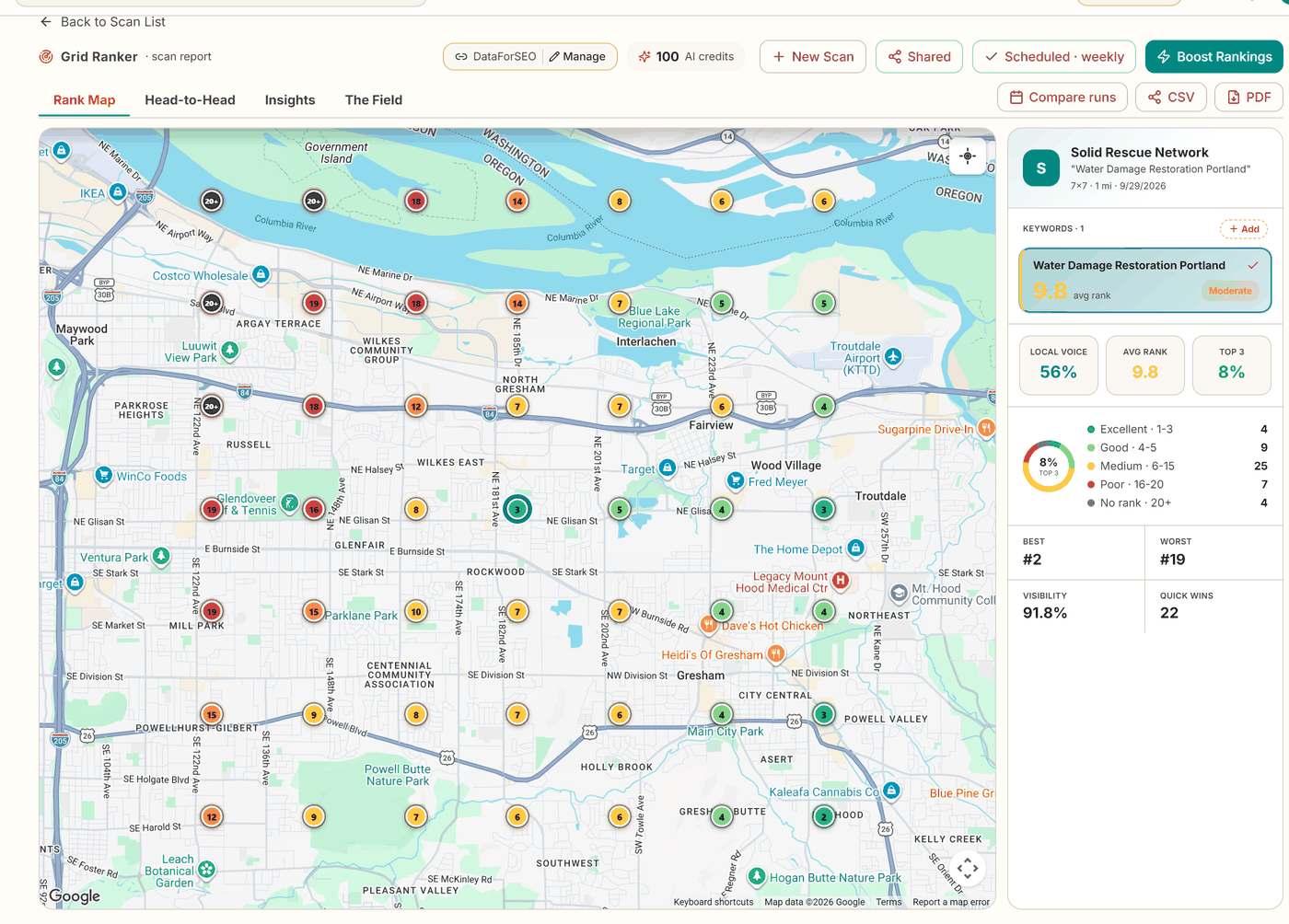
Most local rank checkers search once, from one spot, and give you one number. Grid Ranker searches your keyword from every point on a grid around the business and colours each point by your position in the Google Maps results there. The result is a heatmap of your local rankings across the whole area.
- Green: You are in the top 3 at that point, where most map clicks go. Light green is 4 or 5.
- Yellow: Positions 6 to 10. These near-misses are usually the cheapest ground to win.
- Orange and red: Positions 11 to 20. A competitor holds the map here.
- Grey: Not in the top 20 at all. Searchers at that point do not see you.
Open any point to see the businesses that rank above you from that spot. Check your local rank free
Track any business on Google Maps, without connecting Google.
Yours, a client's or a competitor's. Type the business name or paste its Google Maps link and run a map scan. There is no Google account to connect and no access to ask anyone for.
It works for service-area businesses too. Those are businesses that go to their customers, such as plumbers and cleaners, and hide their address on Google. Paste the Maps link and we find the exact listing.
- Check a prospect before the first sales call.
- See a competitor's map, street by street.
- Connect Google later, only when you want us to look after the profile.
Watch a full scan, start to finish
Seven minutes, a real business, no editing tricks: building the grid, scheduling re-scans, and the side by side competitor view.
Track your map rankings in four steps
From first scan to automatic weekly tracking. No spreadsheets, no guesswork.
Pick your business straight from Google Maps, add up to 5 keywords, and shape the grid: square or round, 3x3 to 13x13, sized in km or miles.
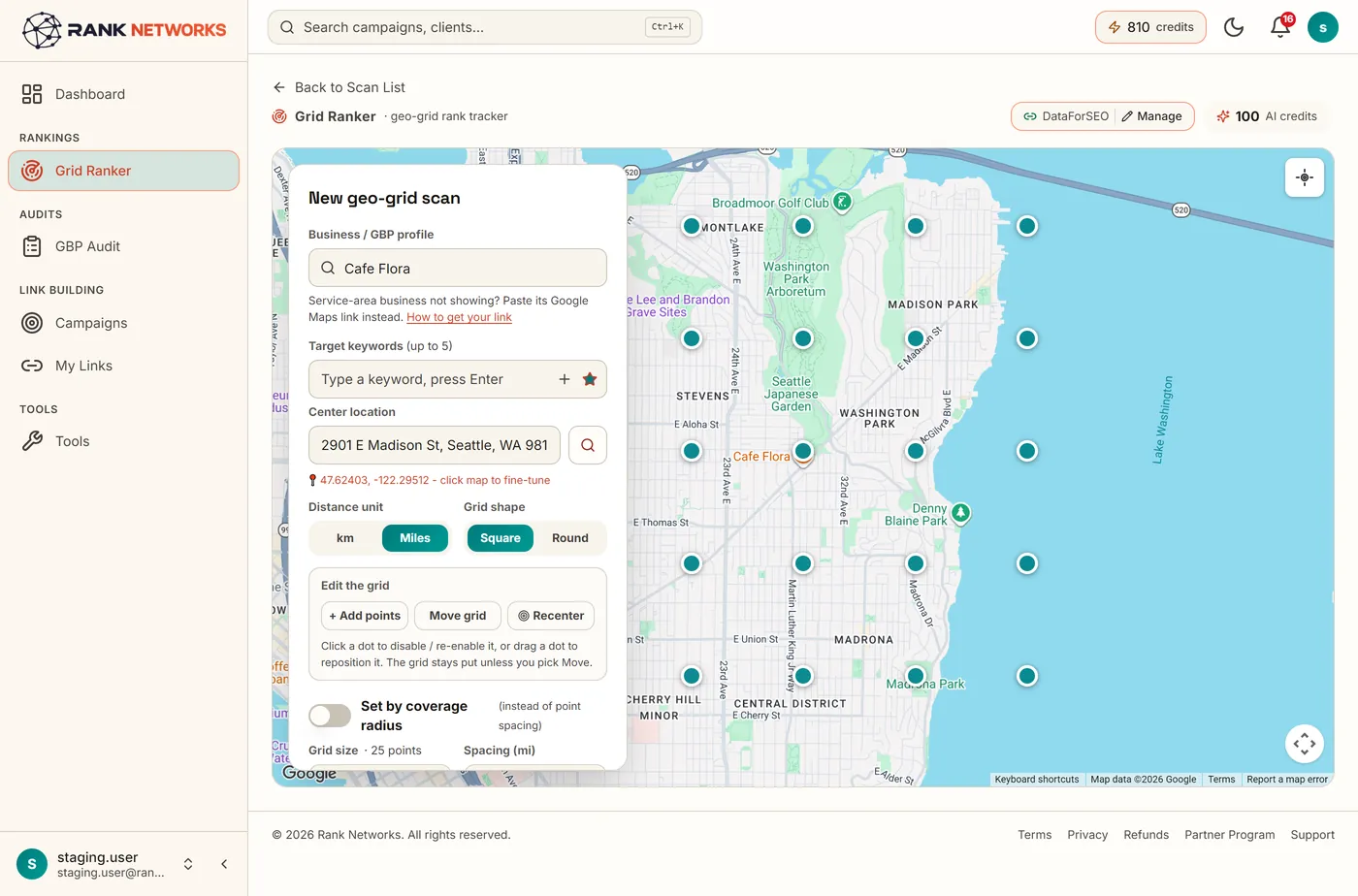
Every dot is a real local-pack search at that spot. Flip between keywords and check Head-to-Head competitors, AI insights and the full field.
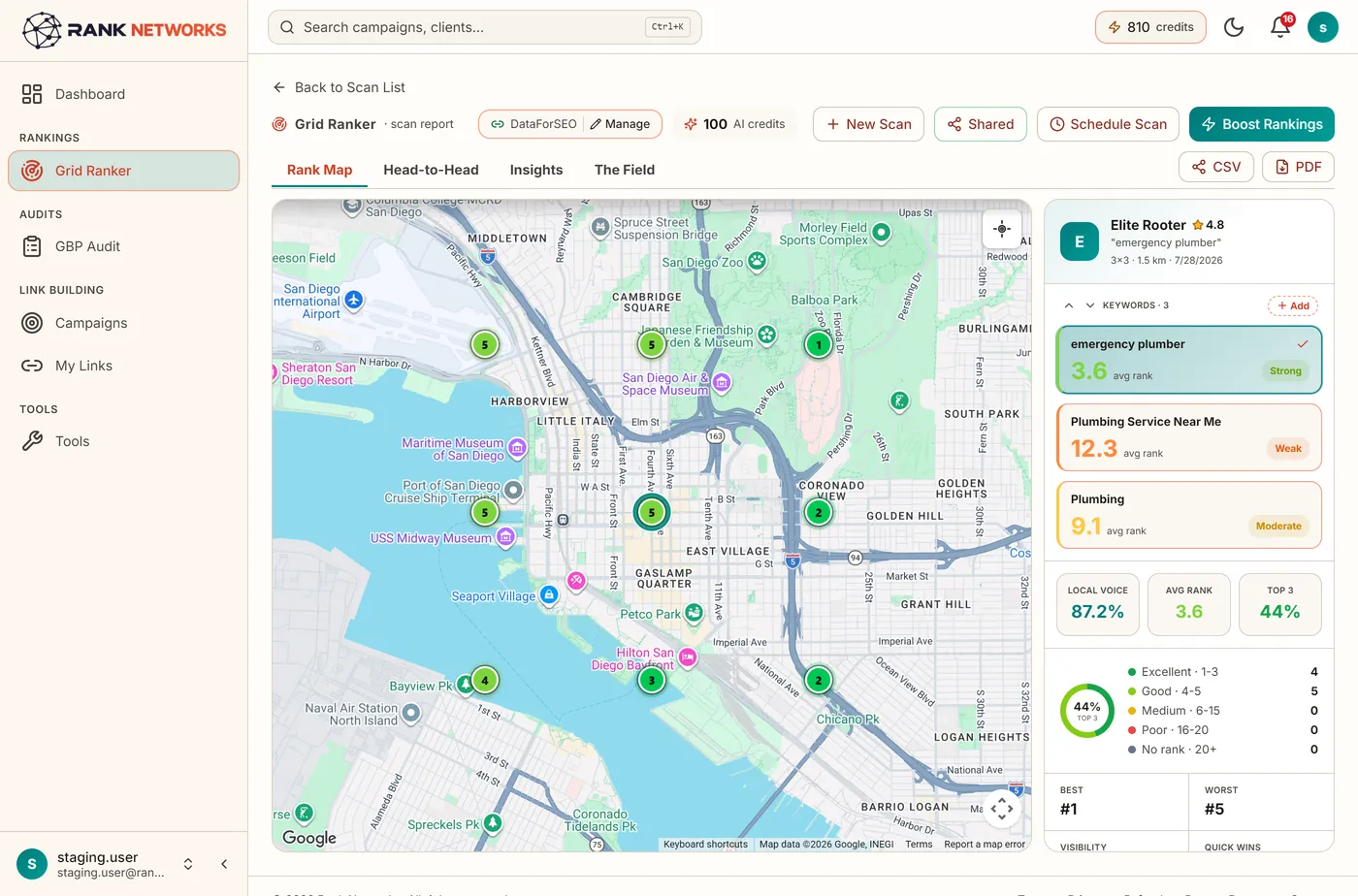
One click turns any scan into a daily, weekly or monthly tracker, with an email report every time a run finishes.
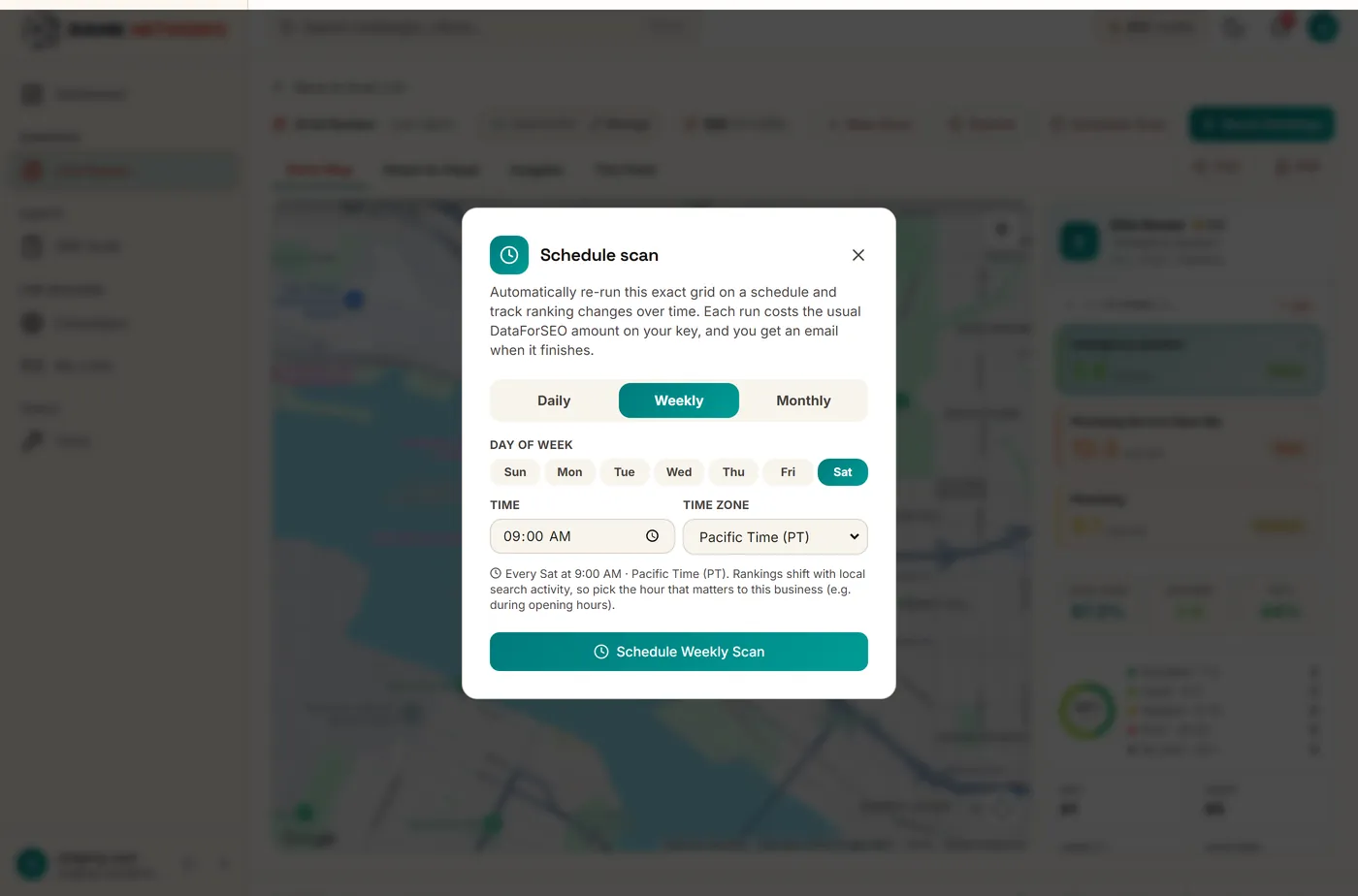
Scheduled scans collect history: average-rank trends, run-versus-run comparison, and a rankings report across every keyword you track.
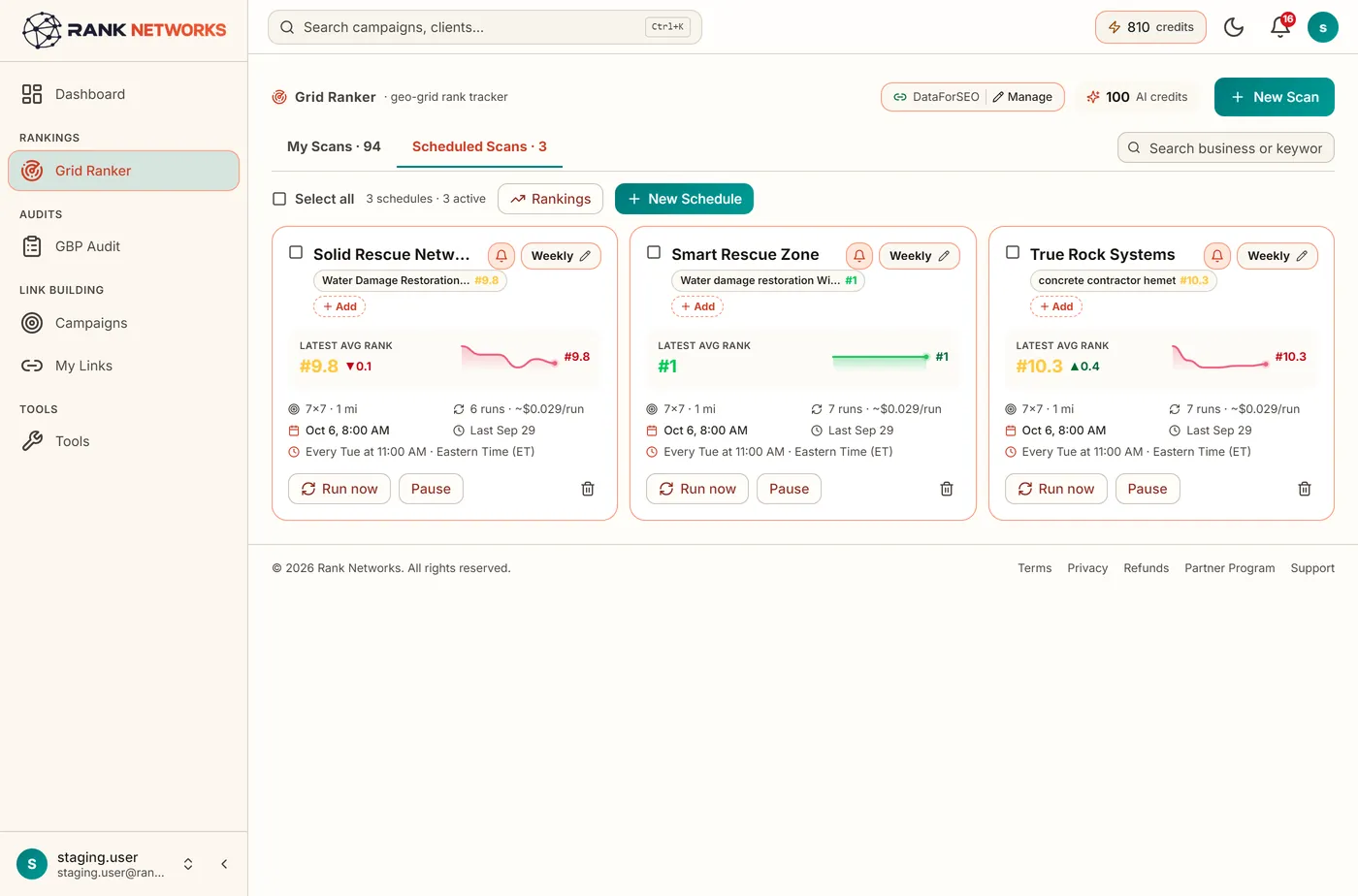
Your rank at every block, not one average
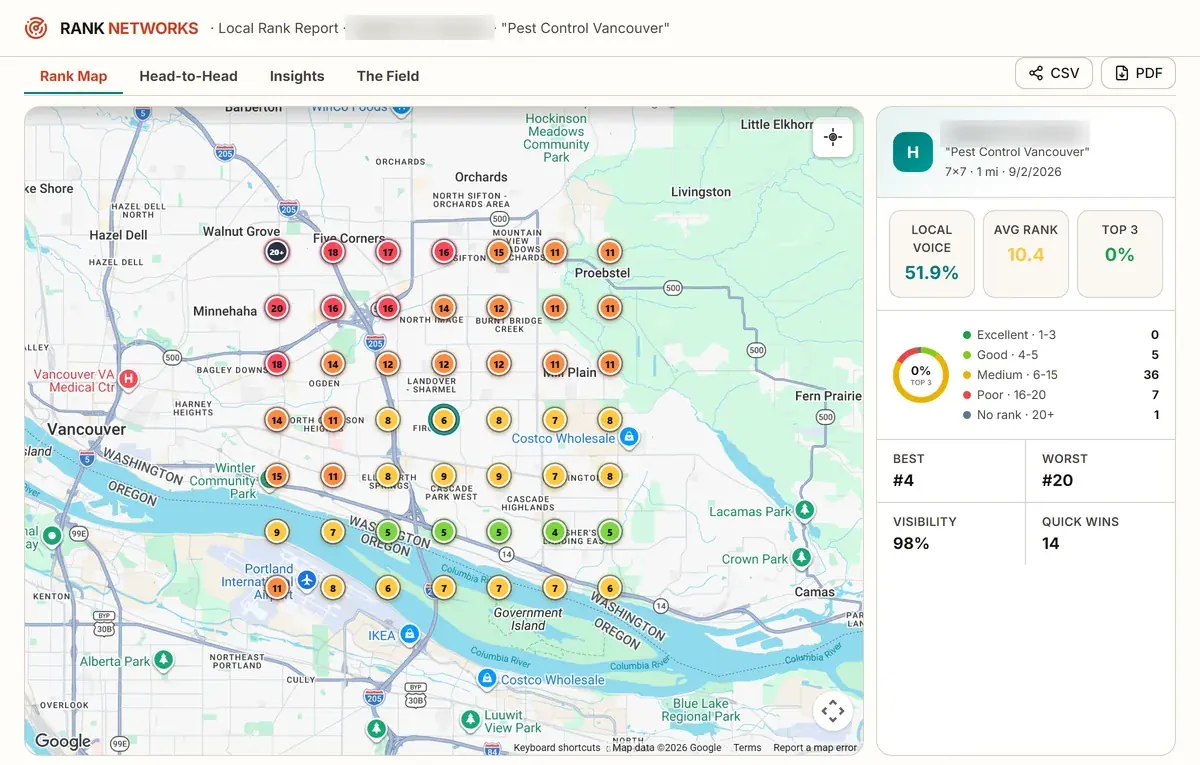
Drop a grid over your service area and see your real Google Maps position at every point. Colour-coded pins make the pattern obvious at a glance: green where you win, red where you are invisible. The panel gives you Share of Local Voice, average rank, top-3 coverage and the full rank distribution.
- Live Google local-pack data at every point
- Share of Local Voice, avg rank, top-3 and visibility %
- Square or round grids from 3x3 up to 13x13
See exactly who is beating you, and where
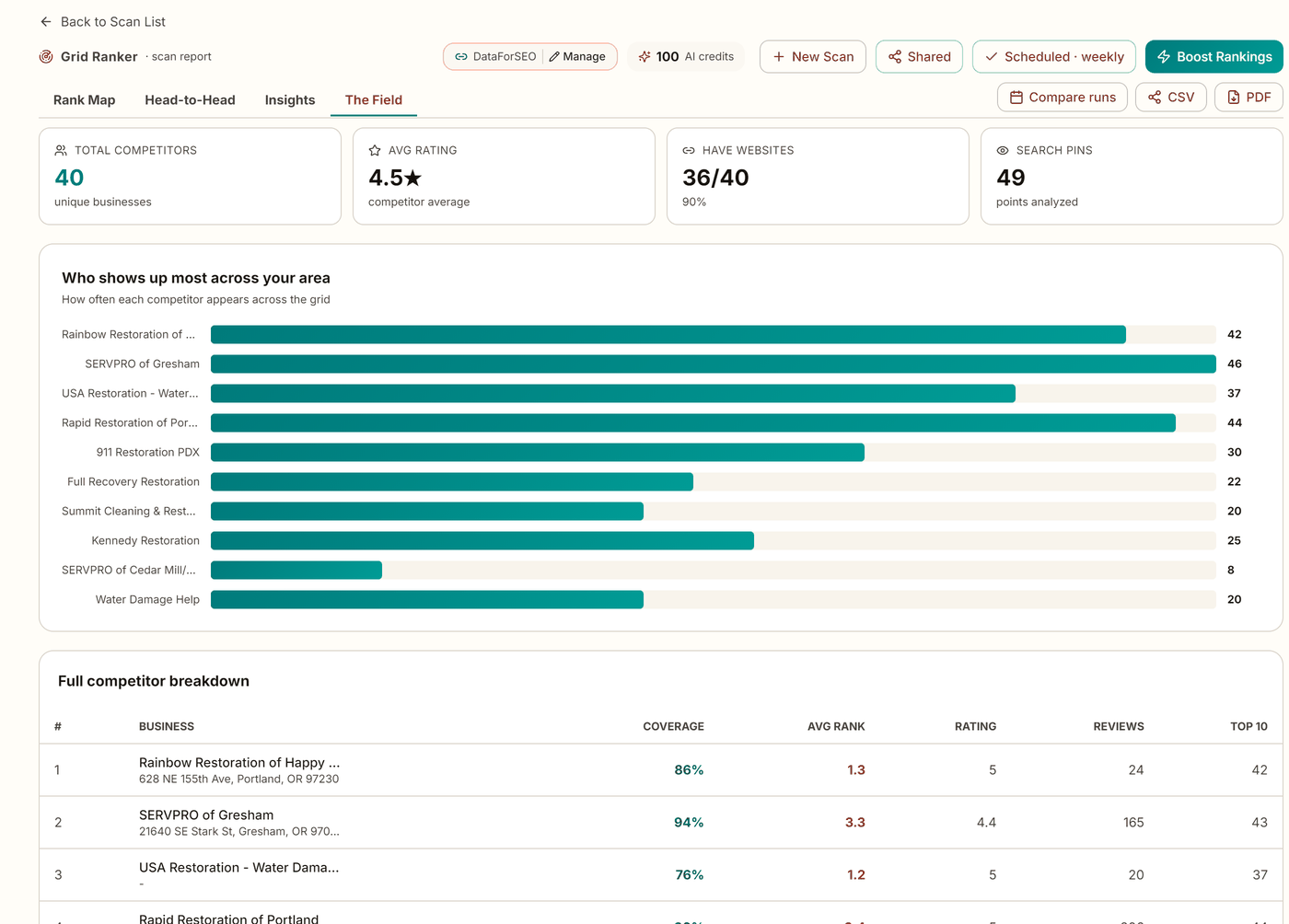
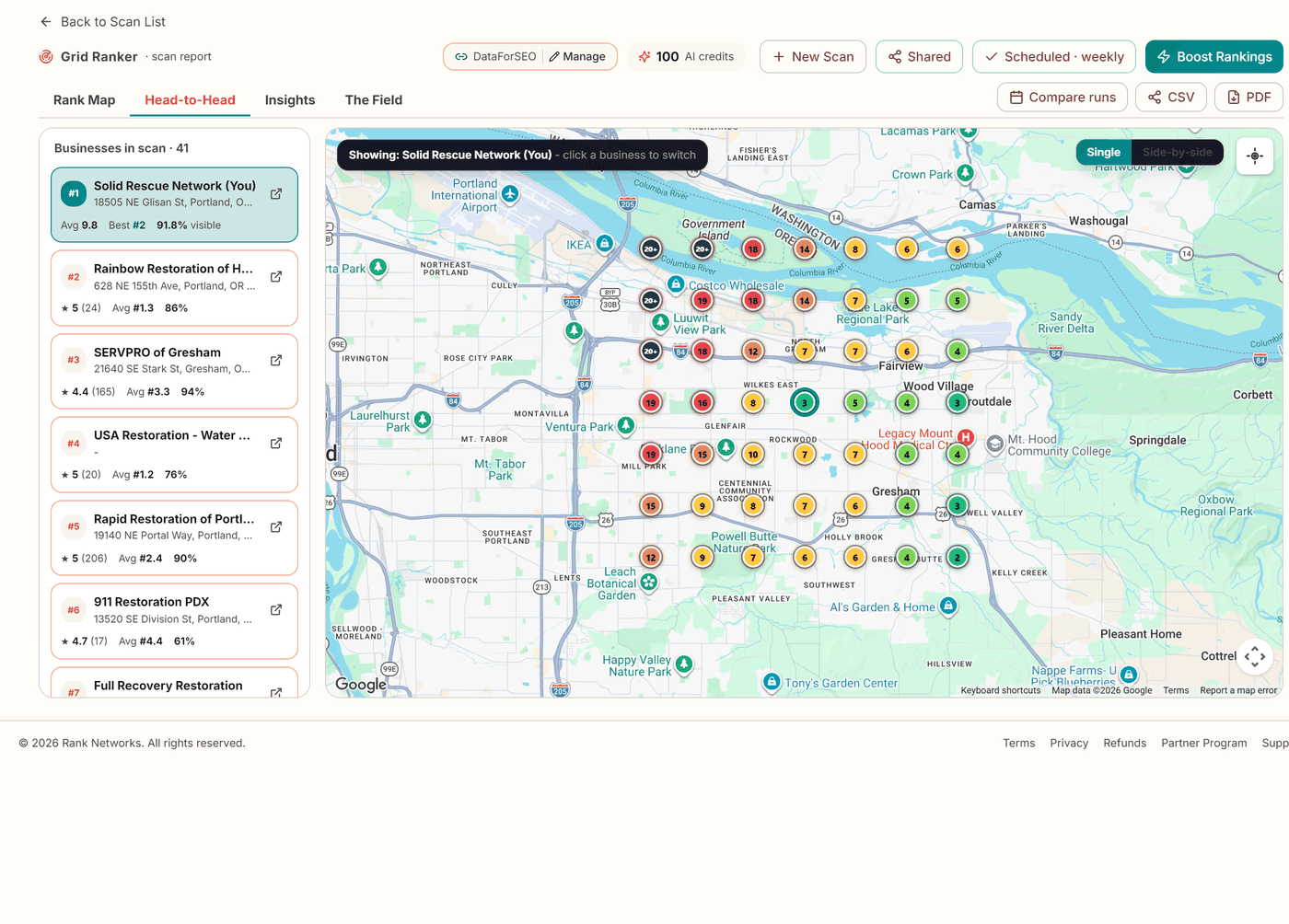
Every scan maps the competitors ranking around you, plots their real locations, and ranks them by how much of your grid they cover. Head-to-Head lets you switch to any rival and see the map from their side, so you know who to target block by block.
- Coverage-weighted competitor leaderboard
- Real competitor locations plotted on the map
- Switch to any rival to see the grid from their side
An AI action plan, not just a dashboard
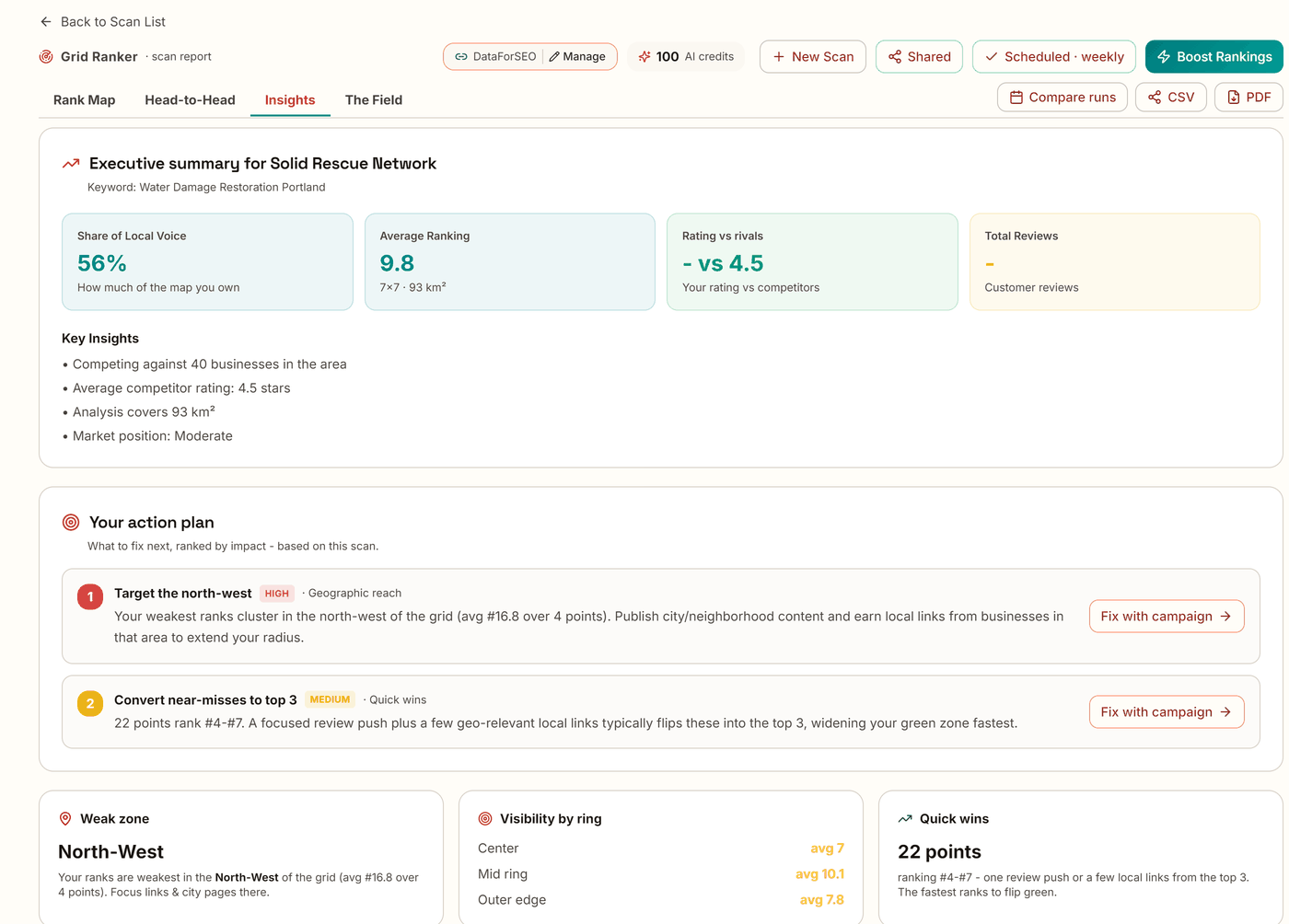
Every scan comes with a plain-English executive summary and a prioritized action plan tied to your actual numbers, the exact zones you are weak in, and the specific competitors ahead of you. No vague advice, and it never invents a problem you do not have.
- Executive summary written from your real data
- Prioritized fixes ranked by impact
- AI summaries included
Beat the specific rivals ahead of you
Line your profile up against any competitor in the scan: their coverage, average rank, rating and review count, side by side. Switch the map to their view and the winnable blocks light up, so your next move is obvious instead of a guess.
- Ranked list of every business in your area
- Coverage, avg rank, rating and reviews at a glance
- View the grid from any competitor’s perspective
Total control over your grid
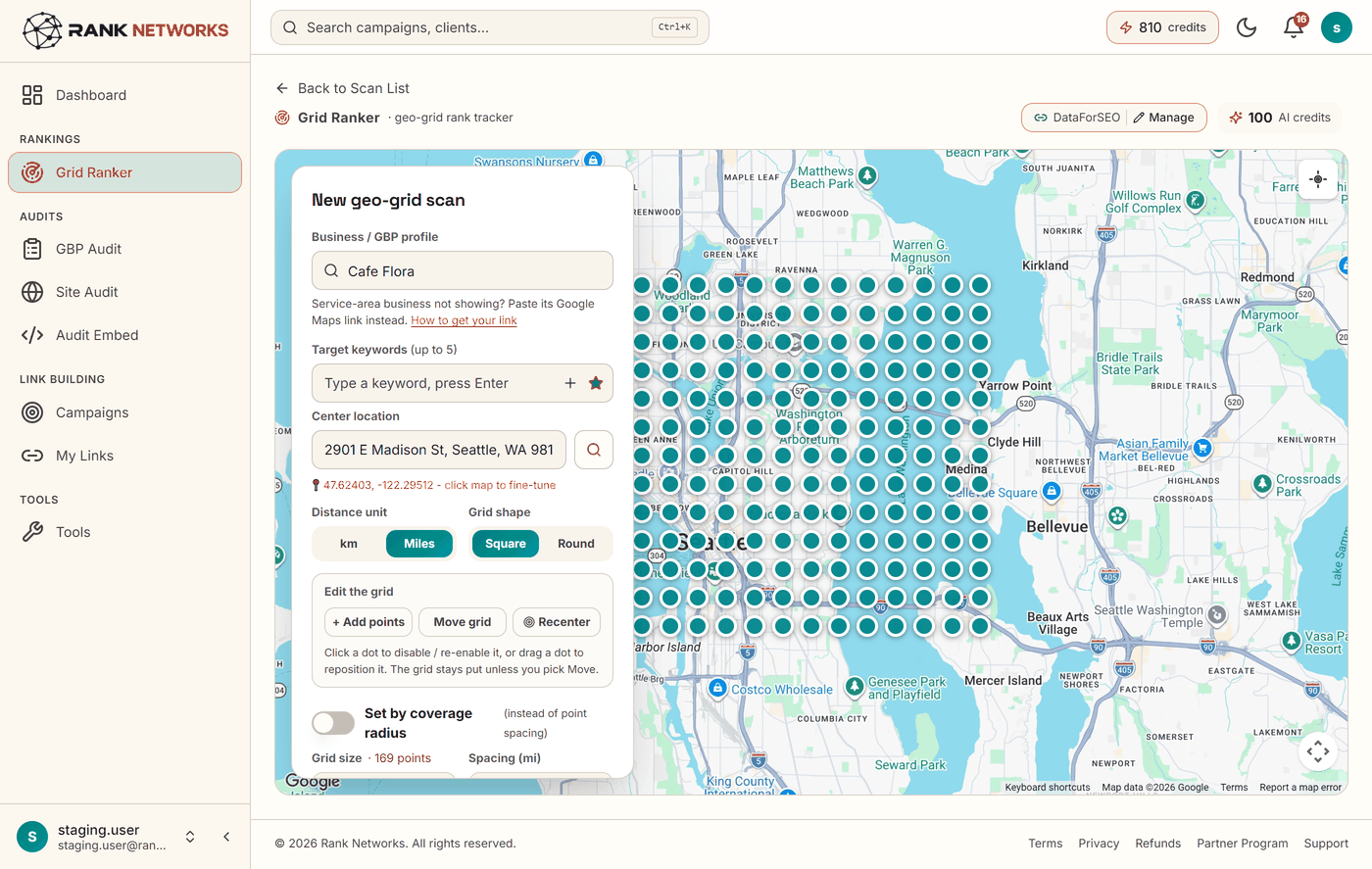
Square or round, 3x3 to 13x13, sized in kilometres or miles. Drag the whole grid anywhere your customers are, move individual points, skip dead zones, or add extra checks exactly where you need them. Bigger grids cover a wider service area, all the way to 169 points.
- Square or round grids, up to 13x13 (169 points)
- Drag, resize, re-center and fine-tune every point
- Set coverage by point spacing or total radius
Track over time. Report to clients.
Daily, weekly or monthly automatic re-scans across every keyword you track, timezone-aware.
A digest with the rendered rank map lands in your inbox each time a scan finishes, with the change vs last run.
Average-rank trend lines and run-versus-run comparison so you can prove momentum over time.
Export a polished PDF for the client meeting or the raw data as CSV for your own analysis.
Send a link that opens the live report with no login. Revoke it any time.
A prioritized action plan with every scan, tied to your real weak zones and the competitors ahead of you.
Simple pricing
Two ways in: buy Grid Credits and scan on our data, or bring your own key. Every package also includes 5,000 to 45,000 Grid Credits a month, shared by all its profiles.
We supply the ranking data. No API key, no external accounts, scan from minute one.
- About 100 scans at 7 by 7
- No monthly charge, Grid Credits never expire
- No data account needed, ever
- Every grid size up to 13 x 13
- Scheduled re-scans and competitor tracking
- Branded client reports and share links
- Another 5,000 Grid Credits for $19 any time
Scans run on your own ranking-data account, so nothing is metered by us.
Creating one is free, takes a couple of minutes, and we walk you through connecting it on your first scan. Scans cost you pennies at wholesale rates.
- Unlimited scans, nothing metered by us
- Every grid size up to 13 x 13
- Scheduled re-scans and competitor tracking
- AI summaries included
- Branded client reports and share links
GBP rank checker for Maps
Some call this a GBP local ranker or GMB rank checker. Try it free to see your profile's rank at each point on the grid.
Questions, answered
See where you really rank
Run your first four scans on us. Enough to see your real coverage across the whole service area before you decide anything.