
Whether the AI names your business, and what to do if it does not
More people ask ChatGPT or Google's AI for a plumber than you would think. AI visibility asks those prompts for you every week, counts how often you are named, and shows the sites the answers rely on.
What it does
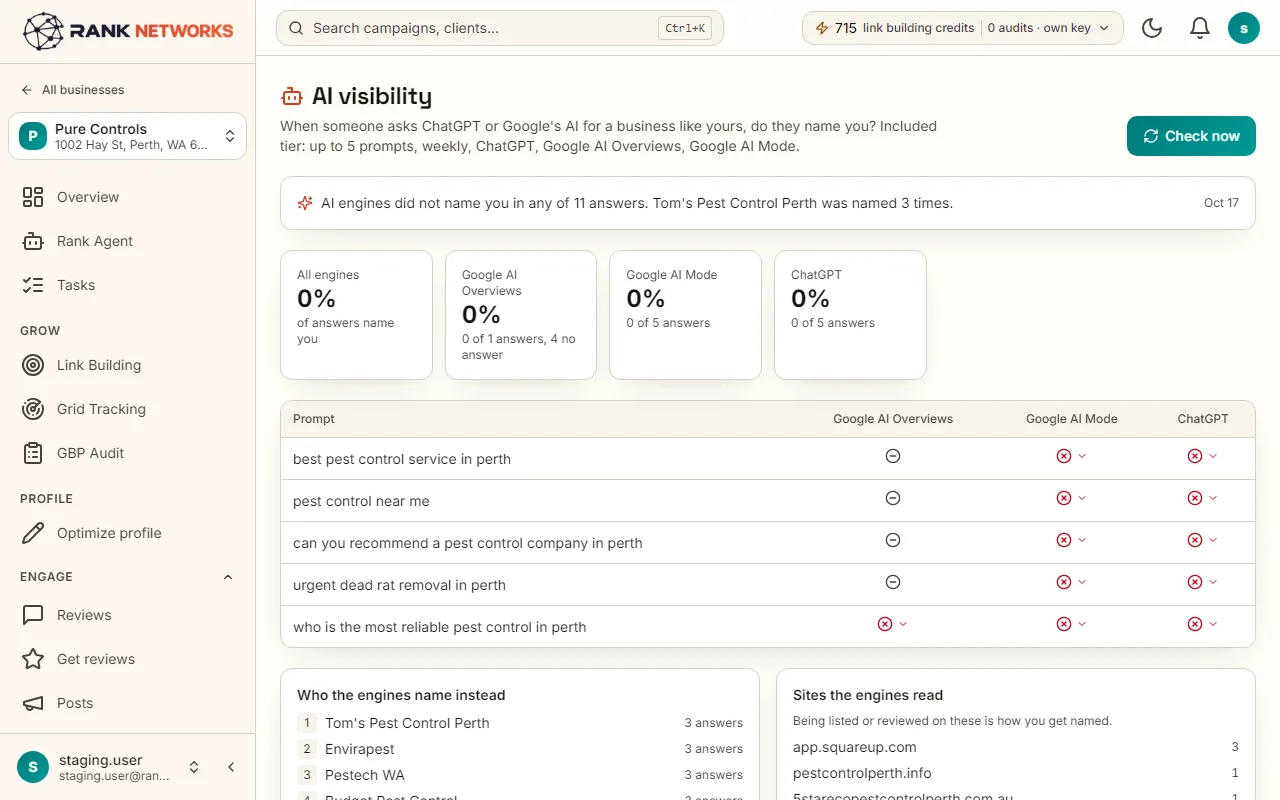
AI visibility takes up to five prompts a customer might type, such as best emergency plumber near Camden, and asks ChatGPT, Google AI Overviews and Google AI Mode every week. AI answers change from run to run, so each prompt can be asked 1, 3, 5 or 7 times and the page says named in 2 of 3 runs instead of a single yes or no. It lists every site the answers cited, so you know where to get listed or reviewed, and runs four readiness checks: whether AI crawlers can read your website, whether Bing knows the business, how your reviews compare with the businesses named, and how recent your posts and pages are. An extended tier asks up to twenty prompts daily and adds Gemini and Perplexity.
A real-life example
Say you run a small hotel in Edinburgh.
Before: You had no idea what ChatGPT said when someone asked for a quiet hotel near the castle, or why a rival always came up.
After: Five prompts run three times each every week. You are named in 4 of 15 answers, and the sites table shows the answers lean on two travel guides and a booking site you are not on. That is your outreach list for the month.
How you would use it
- 1.Open a business and click AI visibility.
- 2.Write up to five prompts the way a customer would type them, or use the suggested ones, and pick how many runs per prompt.
- 3.Run the first check and read, per prompt and engine, how many runs named the business.
- 4.Open the sites table to see which sites the answers cited, and export it as your outreach list.
- 5.Run the readiness checks and work through the fixes, then read the monthly summary.
The mechanism, in plain words
What runs behind the page, what it reads, and where Google's rules shape it.
- Each prompt is asked of ChatGPT and, through paid data services, of Google's AI Overviews and AI Mode in the business's country, as many times as the runs per prompt setting says.
- The answers are read for the business's name and its competitors' names, and every cited page is kept with the engine and the run.
- Cited sites are grouped per prompt and per city, sorted by how many answers cited them, and typed as directory, review site, news or blog list, booking platform, social, your site or a competitor's site.
- Months are compared only when the prompts and runs per prompt were the same in both. Nothing is changed anywhere; the check only reads.
Included in every package
AI visibility comes with every package. Each package covers a number of Google Business Profiles and one shared monthly pool of Grid Credits, links, audits, AI images and keyword searches.
Included in every package: five prompts a week on ChatGPT, Google AI Overviews and Google AI Mode, one run per prompt by default. Each extra run is another paid question, and a business can ask up to 600 a month. The extended tier adds daily checks, twenty prompts, Gemini and Perplexity.
A new account starts with 250 free Grid Credits that never expire. Every package has a 7-day money-back promise. See the full pricing page.
Questions, answered
Try AI visibility on your own profile
Create a free account, connect a Google Business Profile, and pick a package when you are ready. Every package includes every feature.